發表文章

CSS 的虛擬類別 (Pseudo Class) 和虛擬元素 (Pseudo Element)

虛擬類別 (Pseudo Class) 的執行對象是文件樹中已有的元素,而虛擬元素 (Pseudo Element) 則新增了一個文件樹外的元素。兩者的差別在於:有沒有新增一個文件樹外的元素。 虛擬類別 (Pseudo Class)  用於向某些 選擇器 添加特殊的效果,使用一個冒號「:」開頭。 一、錨點虛擬類別 :link :visited :hover :active 二、狀態虛擬類別 :checked、unchecked、:enabled、:disabled 三、-child :first-child:第一個子元素 :last-child:最後一個子元素 :nth-child(數字):第幾個子元素 (從 1 數起,不是從 0) :nth-child(2n):偶數的子元素 (2 的倍數) :nth-child(2n+1):奇數的子元素 :nth-last-child(數字):從後面數來第幾個子元素 :only-child:父元素內只有一個子元素 四、 -of-type :first-of-type:同一種元素的第一個 :last-of-type:同一種元素的最後一個 :nth-of-type(數字):同一種元素裏頭的第幾個 :nth-last-of-type(數字):同一種元素從後面屬過來第幾個 :only-of-type:只有這種元素 虛擬元素 (Pseudo Element) 用於將特殊的效果添加到某些 選擇 ,使用兩個冒號「::」開頭。虛擬元素和真實元素一樣,我們可以把它當做 HTML 中常用的元素來使用,但它只能利用 CSS 來產生,而且並不在文件樹中,所以無法對他們進行分類。 ::before (:before) 在原本的元素「之前」加入內容,以 display:inline-block 的屬性存在。 ::after(:after) 在原本的元素「之後」加入內容,以 display:inline-block   的屬性存在。 ※ ::before (:before) 與 ::after (:after) 一定要 具備 content 的屬性 。 ::first-line (:first-line) :...
虛擬元素一定要具備的 content 屬性

一、虛擬元素 (Pseudo Element) 一定要具備 content 屬性 沒有 content 屬性是不會在畫面上顯示任何東西的,就算是只有 content:""; 都可以。 HTML: <a href="https://dtgunexpectedly.blogspot.tw/" target="_blank">呆頭豬的雲</a> CSS: a::before{   content: attr(href) ; /* 將超連結的 href 內容顯示在前面 */ } a::after{   content: attr(target) ; /* 將超連結的 target 內容顯示在後面 */ } 結果: https://dtgunexpectedly.blogspot.tw/呆頭豬的雲_blank 二、content 內容用一個 空白鍵 就可以不斷「相連累加」 HTML: <a href="https://dtgunexpectedly.blogspot.tw/" target="_blank">呆頭豬的雲</a> CSS: a::before{   content: "( " attr(href) " ) " " ( " attr(target) " ) "; } 結果: ( https://dtgunexpectedly.blogspot.tw/ )  ( _blank ) 呆頭豬的雲 三、content 可以使用 url 放入圖片 CSS: div::before{   content: url(圖片網址) url(圖片網址) ; } 四、content 搭配 quotes 使用 quotes 為定義「括號格式」的屬性。 HTML: 最外層<q>第一層<q>第二層</q><q>第二層<q>第三層</q></q></q>。 CSS: ...

線上 CSS 三角形產生器

一個好用的三角形 CSS 產生器 http://apps.eky.hk/css-triangle-generator/zh-hant

margin 屬性

margin 是設定物件上下左右留白的屬性,依順時鐘方向對上、右、下、左四個方向指定數值。 margin: 10px;  (上下左右各留白 10px) margin: 10px 20px;  (上下留白 10px、左右留白 20px) margin: 10px 20px  30px;  (上留白 10px、左右留白 20px、下留白 30px) margin:  10px  20px  30px  40px;  (上留白 10px、右留白 20px、下留白 30px、左留白 40px) 也可以用 margin-top、margin-bottom、margin-left、margin-right  指定上、下、左、右的留白。指定的值可以為 auto、數值或單位,也可以用負數(負邊距 negative margin)。 要將區塊層級 (block level,如 div)  元件相對於父元件,設定左右置中,可以將元件的左右  margin  設為  auto。 ※  要注意, 相鄰的留白會互相抵消 。如兩個 margin  為 20px  的元件相鄰排列,元件間距會是 20px,而不是 40px。

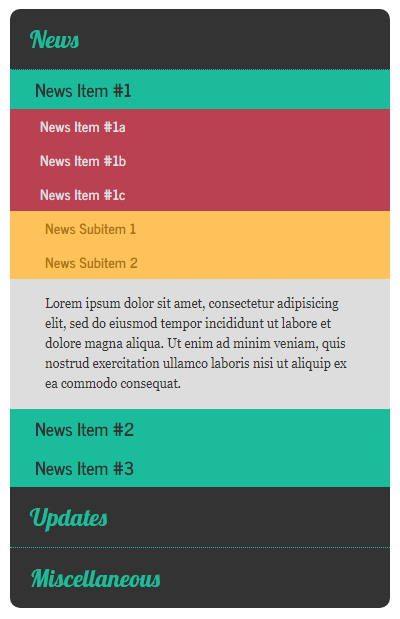
多層級收合式選單 Multi-level Accordion

圖片
CSS: <link href='https://fonts.googleapis.com/css?family=News+Cycle:400,700' rel='stylesheet' type='text/css'> <link href="https://fonts.googleapis.com/css?family=Lobster" rel="stylesheet" type="text/css"> <style> * { margin:0; padding:0; } body { font-size:100%; } .accordion { width:380px; margin:20px auto; } .accordion h1, h2, h3, h4 { cursor:pointer; } .accordion h2, h3, h4 { font-family:"News Cycle"; } .accordion h1 { padding:15px 20px; background-color:#333; font-family:Lobster; font-size:1.5rem; font-weight: normal; color:#1abc9c; } .accordion h1:hover { color:#4afcdc; } .accordion h1:first-child { border-radius:10px 10px 0 0; } .accordion h1:last-of-type { border-radius:0 0 10px 10px; } .accordion h1:not(:last-of-type) { border-bottom:1px dotted #1abc9c; } .accordion div, .accordion p { display:none; } .accordion h2 { padding:5px 25px; background-color:#1abc9c; font-size:1.1rem; ...

線上漸層背景效果的 CSS 碼產生器

線上非常好用的漸層效果 CSS 碼產生器,使用方式和 Photoshop 的漸層工具操作相似。 http://www.colorzilla.com/gradient-editor/

CSS 語法 margin 的互相抵消(Collapsing margins)

圖片
CSS 語法的 margin 在區塊層級 (block level) 元件之間,他的上下 margin 會互相抵消,而在行內層級元件 (display: inline-block;) 或是與 float 相關的元件則不會發生這樣的情形,W3C 稱之為「 Collapsing margins 」。 相鄰的 margin 互相抵消: HTML: <div class="box"></div> <div class="box"></div> CSS: .box {   margin:20px; } HTML: <div class="box"></div> <div class="box-large"></div> CSS: .box {   margin:20px; } .box-large {   margin:30px; } 子元件的 margin 互相抵消 HTML: <div class="parent">   <div class="child"></div> </div> CSS: .parent {   width:200px;   height:100px; } .child {   width:66%;   height:50%;   margin-top:20px; } Collapsing margins 解決方案 要處理這種互相抵消的情況,可以使用 padding 、 border 、 inline-block 及 float 內容來做區分。 透過外元素的 padding .parent {    padding-top: 1px; } 外元素加入 border .parent {   border: 1px solid #fff; } 內元素更改屬性 (inline-block) .child {   display: inline-b...